

Best Modbus Poll Alternatives (2026)
If you're using Modbus Poll and looking for a more modern workflow, this guide compares the best alternatives for testing, simulation, and visualization.
Client + Server + HMI dashboards + 120+ device maps
Why Engineers Look for Alternatives to Modbus Poll
Modbus Poll has been a reliable tool for basic Modbus register testing for many years. However, modern industrial workflows often require more than simple polling. Engineers typically start looking for alternatives when they need:
- Better visualization of live data
- Integrated simulation for testing systems without hardware
- Faster setup without manual register mapping
- A more complete workflow without switching between tools
As systems become more complex, using multiple tools can slow down commissioning and troubleshooting.
Modbus Poll vs Modern Alternatives
Most Modbus tools focus on only one part of the workflow. Modbus Monitor XPF combines testing, simulation, and visualization so engineers can move faster without switching tools.
| Tool | Best For | HMI / Dashboards | Simulation | Device Maps | Notes |
|---|---|---|---|---|---|
| Modbus Monitor XPF | All-in-one testing + visualization | Yes | Yes | 120+ | Best fit for engineers who want testing and dashboards in one workflow |
| Modbus Poll | Register testing | No | Limited / separate workflow | No | Common legacy choice for polling and diagnostics |
| QModMaster | Free basic testing | No | Basic | No | Lightweight but limited for professional workflows |
| CAS Modbus Scanner | Modbus scanning and diagnostics | No | Limited | No | Useful for diagnostics, but not an all-in-one environment |
| Simply Modbus | Learning and simple checks | No | Basic | No | Easy to understand, less capable for larger workflows |
Best Modbus Poll Alternative: Modbus Monitor XPF
Modbus Monitor XPF is built for engineers who need more than basic register polling.
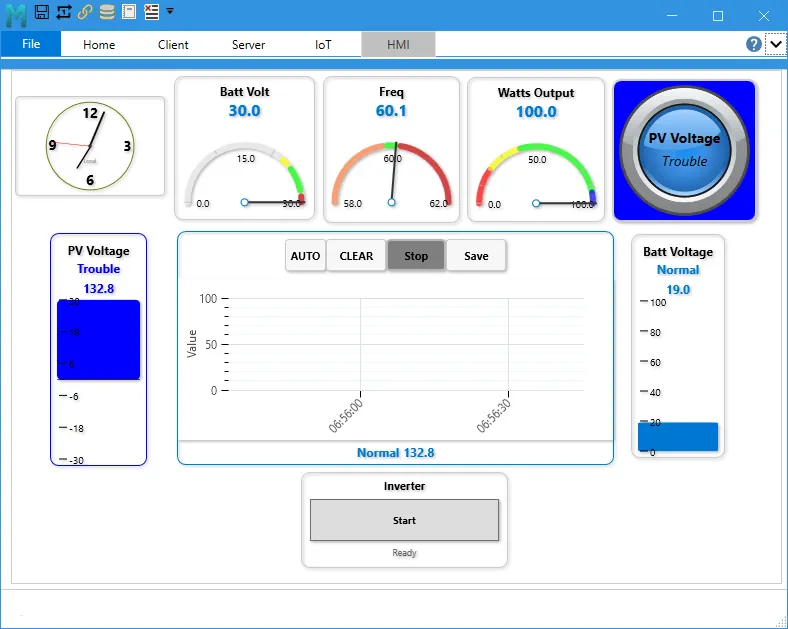
It combines Modbus Client and Server operation, live HMI dashboards, device simulation, register scanning, validation tools, communication logging, built-in trend graphs, and CSV data export in one application. You can run Client and Server simultaneously on one PC, use pre-built device maps, validate live values, and export data for troubleshooting, reporting, or commissioning records. Instead of switching between multiple utilities, you can test, simulate, troubleshoot, and visualize in one workflow.
Complete Testing Platform
Run Modbus Client and Server in one application, including simultaneous operation on one PC for end-to-end testing.
Faster Commissioning
Use pre-built device maps, the register scanner, and guided monitor-point setup to move from unknown device to working data faster.
Built-in HMI Dashboards
Create gauges, trends, controls, and live dashboards without needing a separate SCADA package.
Simulation & Validation
Simulate devices when hardware is unavailable and validate values with color-coded pass/fail checks.
Diagnostics & Logging
Capture timestamped communication logs, filter errors, and export data for troubleshooting and reporting.
Data Export & Trend Analysis
Export values to CSV and use built-in trend graphs to analyze data, compare values, and document commissioning results.
Feature Comparison
The table below highlights the key differences between Modbus Poll and modern alternatives.
| Feature | Modbus Poll | Modbus Monitor XPF |
|---|---|---|
| Register Testing | Yes | Yes |
| HMI Dashboards | No | Yes |
| Simulation | Limited | Yes |
| Device Maps | No | Yes |
| All-in-One Workflow | No | Yes |
Which Tool Should You Choose?
Use Modbus Poll if
- You only need simple register polling
- You are familiar with its interface
- Your workflow is minimal
Use Modbus Monitor XPF if:
- You want dashboards and visualization
- You need simulation and testing together
- You want faster setup with device maps
- You prefer an all-in-one workflow
Explore More Modbus Tools
If you're evaluating different tools, these guides can help you go deeper:
Upgrade Your Modbus Workflow
Modern Modbus systems require more than simple polling. Use a tool that supports testing, simulation, and visualization in one place.