

Modbus HMI Software (Dashboards, Trends & Controls)
Build live Modbus dashboards with gauges, charts, and controls — without a full SCADA system.
Test, simulate, and visualize Modbus data in one workflow.
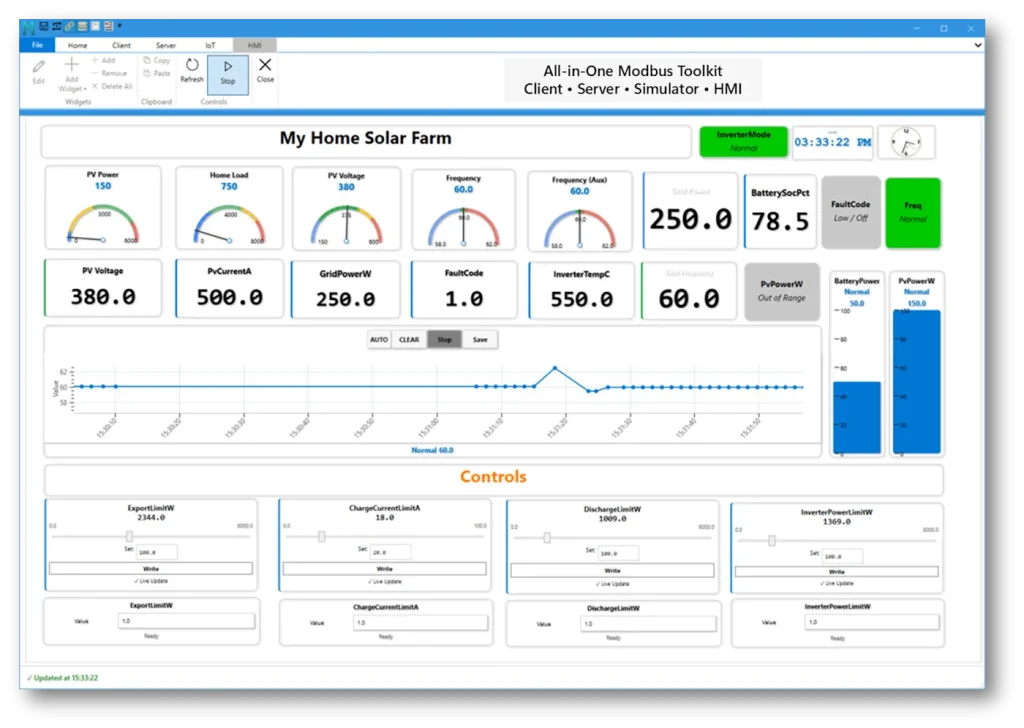
What is Modbus HMI Software?
Modbus HMI software allows engineers to visualize and interact with device data using dashboards, charts, and controls.
Instead of viewing raw registers, HMI systems present data in a more intuitive way for monitoring, testing, and troubleshooting.
Typical HMI systems require separate SCADA tools, configuration, and licensing.
Why Traditional HMI / SCADA Tools Are Overkill
Modbus Monitor XPF is built for engineers who need more than register polling. It combines Modbus testing, simulation, and built-in HMI dashboards in one Windows workflow.
- Complex setup and configuration
- Expensive licensing
- Requires separate Modbus tools
- Slow for quick testing and commissioning
Looking for a Modbus Poll Alternative?
If you're currently using Modbus Poll, you can upgrade your workflow with built-in dashboards and visualization.
Modbus HMI Built Into Your Testing Tool
Modbus Monitor XPF includes built-in HMI functionality directly inside the Modbus testing environment.
This eliminates the need for separate SCADA or HMI software.
🎛️ Live Dashboards
Create real-time dashboards using:
- Gauges
- Trend charts
- Status indicators
🎚️ Modbus Interactive Controls
Add:
- Buttons for command execution
- Sliders for analog value control
- Multi-state controls for device modes
- Bar graphs for quick visualization
- Clock widgets for time-based monitoring
- Custom shapes and line art for dashboard layouts
📊 Modbus Trend Graphs & Data Visualization
- Real-time trend graphs
- Historical comparison
- Signal analysis
⚡ Faster Workflow
Connect → Map → Visualize → Test → Validate
All in one tool
Modbus HMI vs Traditional SCADA
Here’s how Modbus HMI tools compare:
| Feature | Modbus Poll | Modbus Monitor XPF |
|---|---|---|
| Register Testing | Yes | Yes |
| HMI Dashboards | No | Yes |
| Simulation | Limited | Yes |
| Device Maps | No | Yes |
| All-in-One Workflow | No | Yes |
Validation, Logging & Commissioning Tools
Beyond dashboards, Modbus Monitor XPF includes advanced tools for validation, data logging, and commissioning workflows.
These features are typically missing in basic Modbus testing tools.
- CSV data export for analysis and reporting
- Color-coded value validation (pass/fail limits)
- Communication logging for diagnostics
- Restore saved values for faster commissioning
Where Modbus HMI Software Helps
- Commissioning devices
- Troubleshooting systems
- Monitoring live data
- Testing PLC / SCADA logic
- Commission Devices